
Multiple Answers
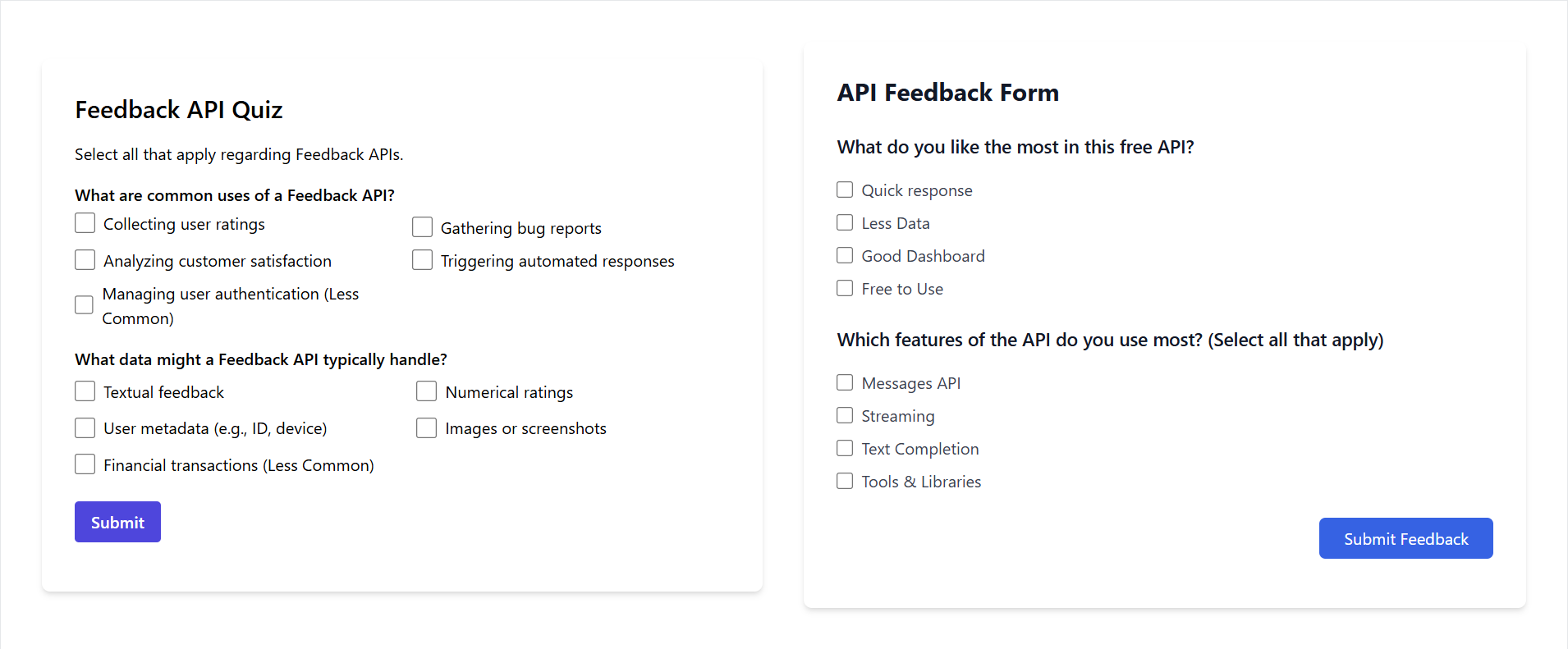
The multipleAnswers API is used to submit a Multiple Answers to the Feedback API. This API is used to collect feedback from users in the form of multiple answer response.
API BASE URL: https://addhuri.com/api/lib/feedback
POST API
This POST request can be used to submit a Multiple Answers to the Feedback API.
Request Endpoint
POST /multipleAnswers
Request Headers
Use the poster API key in the request headers to authenticate the request.
{ "Content-Type": "application/json", "x-api-key-poster": "YOUR_POSTER_API_KEY",}Request Body
{ "question": "string", "options": [ { "text": "string", "value": "string", "data": {} }, { "text": "string", "value": "string", "data": {} } ], "selectedOptions": [ { "text": "string", "value": "string", "data": {} }, { "text": "string", "value": "string", "data": {} } ], "data": {}}Response Body
{ "data": { "id": "string" }, "message": "Feedback saved successfully", "status": "success"}Example
Here is an example of how to submit a Multiple Answers to the Feedback API using different programming languages and tools.
const API_BASE_URL = 'https://addhuri.com/api/lib/feedback'const URL = `${API_BASE_URL}/multipleAnswers`const POSTER_API_KEY = 'YOUR_POSTER_API_KEY'
fetch(URL, {  method: 'POST',  headers: {    'Content-Type': 'application/json',    'x-api-key-poster': POSTER_API_KEY  },  body: JSON.stringify({    "question": "What is the primary benefit of collecting user feedback on an API?",    "options": [      {        "text": "Improve Experience",        "value": "ImproveExperience",        "data": {}      },      {        "text": "Increase Adoption",        "value": "IncreaseAdoption",        "data": {}      },      {        "text": "Reduce Support",        "value": "ReduceSupport",        "data": {}      },      {        "text": "Bug Fixing",        "value": "BugFixing",        "data": {}      }    ],    "selectedOptions": [      {        "text": "Improve Experience",        "value": "ImproveExperience",        "data": {}      },      {        "text": "Reduce Support",        "value": "ReduceSupport",        "data": {}      }    ],    "data": {}  })})
import requests
API_BASE_URL = 'https://addhuri.com/api/lib/feedback'URL = f'{API_BASE_URL}/multipleAnswers'POSTER_API_KEY = 'YOUR_POSTER_API_KEY'
headers = { 'Content-Type': 'application 'x-api-key-poster': POSTER_API_KEY}data = { "question": "What is the primary benefit of collecting user feedback on an API?", "options": [ { "text": "Improve Experience", "value": "ImproveExperience", "data": {} }, { "text": "Increase Adoption", "value": "IncreaseAdoption", "data": {} }, { "text": "Reduce Support", "value": "ReduceSupport", "data": {} }, { "text": "Bug Fixing", "value": "BugFixing", "data": {} } ], "selectedOptions": [ { "text": "Improve Experience", "value": "ImproveExperience", "data": {} }, { "text": "Reduce Support", "value": "ReduceSupport", "data": {} } ], "data": {}}response = requests.post(URL, headers=headers, json=data)curl -X POST "https://addhuri.com/api/lib/feedback/multipleAnswers" \-H "Content-Type: application/json" \-H "x-api-key-poster: YOUR_POSTER_API_KEY" \-d '{ "question": "What is the primary benefit of collecting user feedback on an API?", "options": [ { "text": "Improve Experience", "value": "ImproveExperience", "data": {} }, { "text": "Increase Adoption", "value": "IncreaseAdoption", "data": {} }, { "text": "Reduce Support", "value": "ReduceSupport", "data": {} }, { "text": "Bug Fixing", "value": "BugFixing", "data": {} } ], "selectedOptions": [ { "text": "Improve Experience", "value": "ImproveExperience", "data": {} }, { "text": "Reduce Support", "value": "ReduceSupport", "data": {} } ], "data": {}}'GET API
This GET request can be used to retrieve records from the Feedback API.
Request Endpoint
GET /multipleAnswers
Request Headers
Use the master API key in the request headers to authenticate the request.
{ "Content-Type": "application/json", "x-api-key-master": "YOUR_MASTER_API_KEY",}Request Query Parameters
Use the following query parameters to retrieve records from the Feedback API.
GET /multipleAnswers?page=1&limit=10
| Parameter | Type | Default | Min | Max | Description |
|---|---|---|---|---|---|
| page | number | 1 | 1 | - | The page number to retrieve. |
| limit | number | 10 | 1 | 100 | The number of items to retrieve per page. |
Response Body
The response will contain an array of Multiple Answers.
{ "data": [ { "type": "MultipleAnswers", "id": "e23d2224-700b-4ee2-a314-93c5a75ba5d6", "createdAt": "2025-01-05T12:29:19.225Z", "updatedAt": "2025-01-05T12:34:34.451Z", "question": "What is the primary benefit of collecting user feedback on an API?", "options": [ { "text": "Improve Experience", "value": "ImproveExperience", "data": {} }, { "text": "Increase Adoption", "value": "IncreaseAdoption", "data": {} }, { "text": "Reduce Support", "value": "ReduceSupport", "data": {} }, { "text": "Bug Fixing", "value": "BugFixing", "data": {} } ], "selectedOptions": [ { "text": "Improve Experience", "value": "ImproveExperience", "data": {} }, { "text": "Reduce Support", "value": "ReduceSupport", "data": {} } ], "data": {} } ], "page": 1, "limit": 10, "total": 1, "totalPages": 1, "message": "", "status": "success"}Example
Here is an example of how to submit a Multiple Answers to the Feedback API using different programming languages and tools.
const API_BASE_URL = 'https://addhuri.com/api/lib/feedback'const URL = `${API_BASE_URL}/multipleAnswers`const MASTER_API_KEY = 'YOUR_MASTER_API_KEY'
fetch(URL, {  method: 'GET',  headers: {    'Content-Type': 'application/json',    'x-api-key-master': MASTER_API_KEY  }})
import requests
API_BASE_URL = 'https://addhuri.com/api/lib/feedback'URL = f'{API_BASE_URL}/multipleAnswers'MASTER_API_KEY = 'YOUR_MASTER_API_KEY'
headers = { 'Content-Type': 'application 'x-api-key-master': MASTER_API_KEY}
response = requests.get(URL, headers=headers)curl -X GET "https://addhuri.com/api/lib/feedback/multipleAnswers" \-H "Content-Type: application/json" \-H "x-api-key-master: MASTER_API_KEY"